Building a new product design workflow
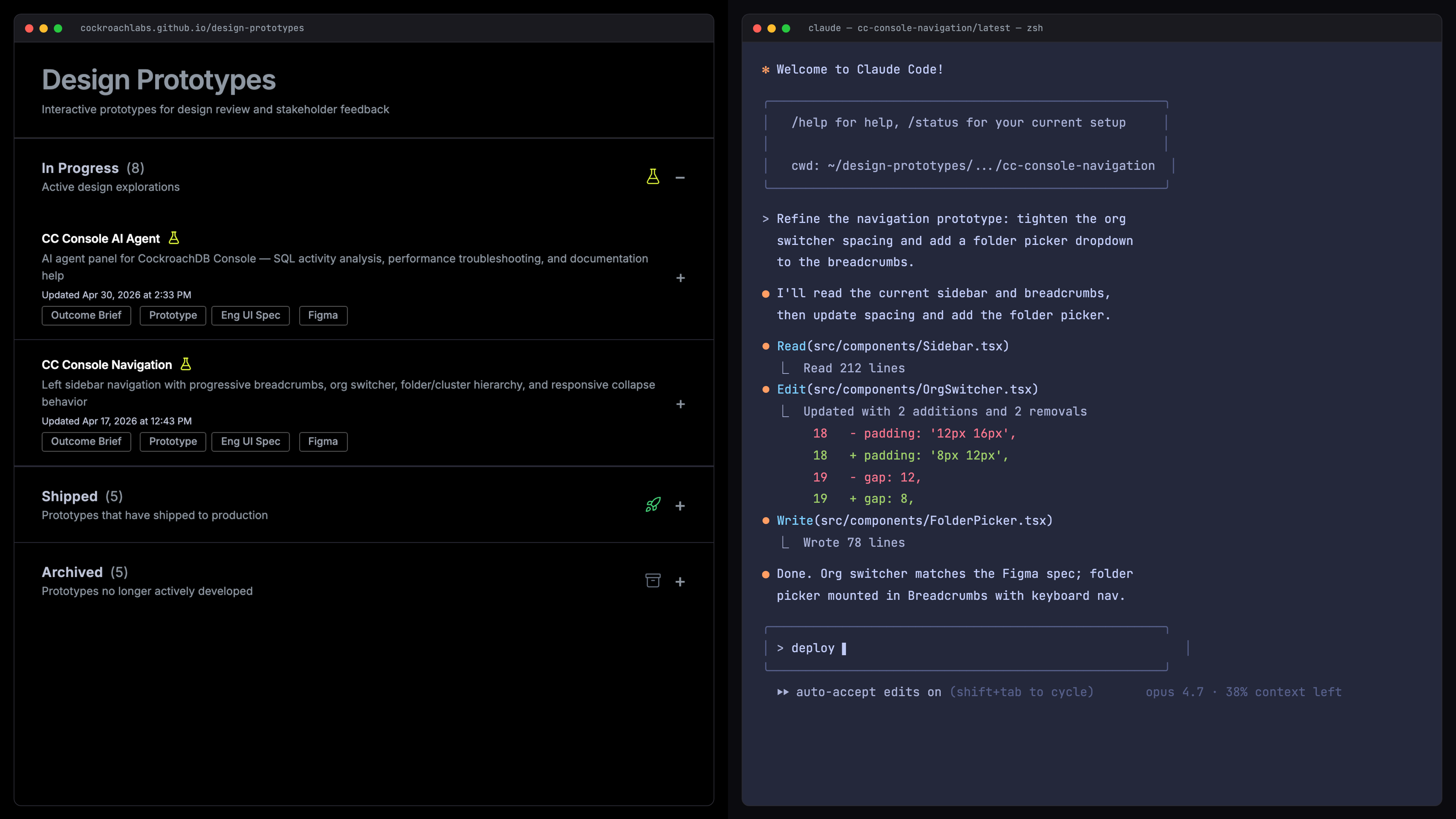
Like many designers, my day-to-day design workflow looks very different from what it was 6 months ago. I thought I'd share how my process has evolved using AI tools, and how it's changed the way I work with PMs and engineers, who now often come to me with initial prototypes of their own.
Before
Projects typically started from a PM brief or a requirements doc. I’d create Figma mockups built from a component library which represented the production codebase components. I’d then manually wire up click-through prototypes to emulate the UX flows for testing and internal feedback. It was a very manual process and the prototype never quite behaved exactly like the product.
Now
Projects come in from a lot of different places. PMs and engineers are now building rough prototypes too, which means a lot of my projects start from someone else’s working code. A few examples from the last couple of months:
Pair-prototyping with a PM
Recent example: Cloud console navigation redesign. Starting from a vision brief about rethinking a larger surface. I pushed a prototype to a shared GitHub repo and iterated on it with a PM. We each cloned it, made our own versions, and ended up with many variants between us before converging.
Working from an engineer's branch
Recent examples: Billing forecasting and migration assistant UX. An engineer has a working version and sends a Loom walk-through plus the branch. I pull the code down, make design changes, and share an updated prototype and spec for engineering to implement against.
Starting with a PM's Figma Make prototype
Recent example: Multi-factor authentication UX. A PM makes an initial Figma Make prototype. I download the generated code and rebuild it with real production components, data, and interaction states. Figma Make is the starting point to get the idea across; rebuilding it with Claude Code makes it production-accurate.
Starting with PM + eng requirements
Recent example: Agent roach (AI assistant). Starting point is a product brief and eng doc outlining the LLM requirements. I build a few versions exploring different UX approaches, then cross-check the prototype against the eng design doc to verify we were capturing all the technical details.
Production repo experimentation
Recent examples: Superuser dashboard and DB Console plan pinning. Designing directly in the production codebase instead of building a separate prototype, so far on lower-stakes, internal-facing surfaces. Nothing has shipped this way yet, but I'm curious where it pays off vs. when a standalone prototype is the better move.
What ties it together
Underneath all of those starting points, I’m using Claude Code in roughly three modes:
- Standalone prototypes built locally and deployed to a GitHub repo for sharing.
- From a PM or engineer’s working prototype or branch, where someone has already built a rough version and I take it and refine the UX from there.
- Branches off the production repo, designing in the real codebase instead of a separate prototype.
A few things I like about working this way regardless of the mode:
- It reads our actual production codebase, so whether I’m building a prototype or editing the real app, the components and data are the same as production.
- It has access to my local files and our company tools (Jira, Figma, Slack, Drive), so I’m not constantly switching contexts.
- I can iterate as much as the design needs.
The output looks a bit different depending on the path: a clickable prototype at a shareable URL, or a working branch ready for engineering review. In both cases, engineering specs and Figma frames can be generated directly from the code.
The steps
Roughly how a project moves through my setup:
Create
Clone a base prototype (a stripped-down version of our production console) with shared navigation and components.
Build
Describe the UI in natural language. Claude Code implements it using our production component library, plus conventions I've captured in memory files.
Iterate
Compare design variants side by side via a flow-selector dropdown built into every prototype.
Deploy
Push to GitHub Pages via a deploy script that handles validation, build, and a stable shareable URL.
Review
Share with stakeholders, who can leave feedback via an in-prototype comment widget. Toggle annotations to show what's new vs. existing. Iterate same-day.
Spec
Generate an engineering spec via a custom skill that cross-references the prototype and the production codebase together.
States
Export to Figma via a Playwright script that captures every documented state as a frame, with design tokens bound.
Improve
After each project, run a session-improve skill that turns recurring friction into new scripts, skills, or memory rules.
Most of these started as friction points that turned into a script or a small skill over time. This process will probably look very different a few months from now. What feels durable is the habit of building it, not any specific tool.
I’d love to hear from you
- What does your design process look like right now?
- Where are the friction points you haven’t gotten around to fixing yet?